Watch US Paramount+ Outside the US | USip VPN
Watch U.S. Paramount+ Outside the U.S. with a Residential U.S. IP

Paramount+ is available in many countries, including the United States, the United Kingdom, France, Germany, Canada, Mexico, and Australia — but the versions are not identical. U.S. Paramount+ can differ from local Paramount+ versions in catalogue, live channels, sports, Showtime content, add-ons, plan types, billing, app-store region, and account rules.

That is why access to U.S. Paramount+ from outside the U.S. rarely comes down to one single factor. IP location matters, but account status, subscription type, billing country, app-store region, device type, and Paramount+ regional rules can all affect what you see and what actually plays.

Residential US IP gives you a U.S. residential IP connection — the IP-location layer of the setup. It does not include a Paramount+ subscription, does not create a U.S. Paramount+ account, does not convert a local Paramount+ account into a U.S. account, and does not guarantee access to every title on every device. This page explains what a residential U.S. IP can realistically help with, and how to test it step by step.

Last Updated on: August 15, 2026

14-Day Money-Back Guarantee

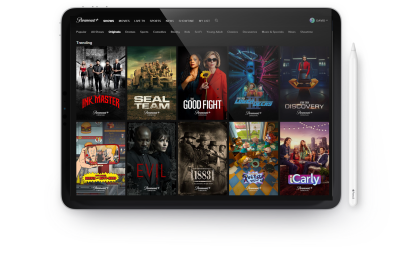
Paramount+ on a desktop tested with a U.S. residential IP

Why U.S. Paramount+ Can Be Different Outside the U.S.

Paramount+ global regions include the United States, the United Kingdom, France, Germany, Canada, Mexico, Australia, and other countries — but each region can have its own catalogue, content rights, sports coverage, live channels, plan options, add-ons, and billing rules. A viewer in the UK, France, Germany, or another supported country may not see the same service behaviour as a viewer in the United States.

Some markets are structured differently again: the Paramount+ international availability page notes that the service launches in select markets, and in some European countries — Spain is a common example — Paramount-related content may be distributed differently, including through SkyShowtime where applicable, rather than through a direct local Paramount+ launch.

An IP address is an important location signal, but it is not the only one. Streaming services can also consider account details, billing country, app-store region, device settings, browser location data, cookies, and stored app or browser data. The type of IP matters too: shared data-center VPN IPs are used by many people at the same time and can be easier to identify, while a residential U.S. IP looks closer to a standard U.S. home internet connection — a more natural starting point when your connection needs to appear as a normal U.S. household connection.

14-Day Money-Back Guarantee

VPN Security

When a Residential U.S. IP Helps — and When It Does Not

A residential U.S. IP addresses one specific layer: where your connection appears to come from. It does not change your Paramount+ account, subscription, billing country, or app-store region. The table below shows common situations and what a residential U.S. IP can realistically do in each one.

SituationCan a residential U.S. IP help?What to check next
You already have a U.S. Paramount+ account and are travelling abroadYes — it can help your connection appear as a U.S. residential connection.Test Paramount+ in a desktop browser first, then move to mobile or TV devices.
Paramount+ shows an availability or location messageIt may help if the issue is caused by a blocked shared VPN or data-center IP.Reconnect, clear browser or app data, confirm your public IP, and test again.
You have a local Paramount+ account outside the U.S.It may help with U.S. IP location, but it may not change the account region.Your account region, plan, billing country, app-store region, and catalogue rules may still remain local.
You need to create or pay for a U.S. Paramount+ accountIt only helps with IP location.Paramount+ account, payment method, billing details, ZIP code, gift-card rules, and subscription terms may still apply.
You cannot download the Paramount+ appNot by itself.Your Apple App Store, Google Play, Roku, Fire TV, Apple TV, or Smart TV region may affect app availability.
You want U.S. live channels, sports, Showtime content, or add-onsIt may help with the network-location layer, but content rights and plan rules may still apply.Check Paramount+ plan, add-on, sports, live-channel, device, and regional requirements.

Regular VPN vs Residential U.S. IP for Paramount+

Not every U.S. IP option behaves the same way with streaming services. The main differences come from the type of IP address each option provides — and how easily that IP type can be identified as something other than a normal home connection.

OptionTypical IP typeWhy Paramount+ may reject itResult
Free VPNShared or overloaded VPN IPOften used by many people and easy to flag.High chance of errors or unstable playback.
Standard VPNData-center IPStreaming services can often detect repeated use from the same server ranges.May work sometimes, but can be blocked.
Smart DNS onlyNo real U.S. IP changeMay not satisfy all account, app, billing, device, or location checks.Useful for some devices, but not a complete solution.
Residential US IPU.S. residential IPLooks closer to a normal U.S. home internet connection.Better fit for users who need a U.S. residential IP layer.

How to Watch U.S. Paramount+ Outside the U.S.

Our Mission

Start with a desktop browser test — not with Smart TV, Roku, Fire TV, Apple TV, or router setup. TV devices add extra variables such as app-store region and app availability, which makes troubleshooting harder. Desktop testing isolates the IP-location layer first.

  1. Set up Residential US IP. Install and configure Residential US IP on your computer.
  2. Connect to a U.S. residential IP. Start the connection and confirm that your public IP address shows a U.S. location before opening Paramount+.
  3. Test Paramount+ in a fresh desktop browser session. Use a private or incognito window so cached cookies and stored location data do not interfere.
  4. Sign in to Paramount+ and test playback before moving to mobile, TV, or router setup. Choose a regular on-demand title for the first test.

If a title plays normally on desktop, the IP-location layer is likely working, and you can extend the same setup to other devices. If Paramount+ still shows an error, check account status, subscription, billing details, browser location settings, cookies, app-store region, device region, local account region, and Paramount+ availability rules — the cause is often in one of these layers rather than in the connection itself.

14-Day Money-Back Guarantee

Account, Subscription, Billing, App Store, and Device Notes

Residential US IP provides the U.S. IP connection layer. Paramount+ still controls account eligibility, subscription access, billing, app availability, device compatibility, catalogue access, live channels, sports, add-ons, and content availability. The notes below cover the most common scenarios.

Existing U.S. Paramount+ account

This is usually the cleanest scenario. Connect to Residential US IP, confirm the U.S. public IP, open Paramount+ in a fresh browser session, and sign in with the existing U.S. account. If desktop playback works, then test mobile, TV, or router setup. Keep account and billing details up to date directly with Paramount+.

Local Paramount+ account outside the U.S.

A local Paramount+ account may remain tied to local catalogue, billing, app-store, plan, and account rules even when the connection uses a U.S. IP. Do not assume a VPN or IP change will convert a UK, French, German, Canadian, Mexican, Australian, or other local Paramount+ account into a U.S. account. If your goal is specifically the U.S. service, the account layer matters as much as the IP layer.

New U.S. Paramount+ account or payment issue

A U.S. IP does not automatically create a valid U.S. Paramount+ account or payment profile. Paramount+ may require compatible payment details, billing information, a ZIP code, gift-card conditions, or other account rules. These requirements are controlled by Paramount+, not by the IP connection.

App Store and device region

If the Paramount+ app is not visible or installable on a device, the issue may be the Apple App Store, Google Play, Roku, Fire TV, Apple TV, or Smart TV account region rather than the IP. A VPN connection alone may not make the app appear, because store and device regions are set at the account or device level.

Live channels, sports, Showtime content, and add-ons

U.S. Paramount+ live channels, CBS-related content, sports, Showtime content, add-ons, and regional content may depend on current rights, plan type, location rules, account type, and device support. Test regular on-demand playback first before troubleshooting live or add-on content — if on-demand works and a specific live channel or add-on does not, the cause is usually rights or plan rules rather than the IP.

14-Day Money-Back Guarantee

Device Setup for U.S. Paramount+ Outside the U.S.

Desktop should be the first test. Once Paramount+ works in a desktop browser, move the same setup to mobile, streaming devices, Smart TV, or router.

Windows and Mac

Desktop is the best first test. Install Residential US IP, connect to a U.S. residential IP, open a private browser window, go to Paramount+, and test playback. A clean browser session avoids cached cookies and stored location data from earlier visits.

iPhone, iPad, and Android

Mobile devices may add extra signals on top of the IP address, such as app-store region, GPS and location services, cached app data, and previous login sessions. Connect to the U.S. residential IP before opening Paramount+, then restart the app — or clear app data — if it still shows a location or availability message.

Smart TV, Apple TV, Fire TV, and Roku

Many TV devices do not support VPN apps directly. Use router setup or another supported network method so the TV connects through the U.S. residential IP. Also check whether the Paramount+ app is available in that device’s account region — if the app is missing from the store, the cause is usually the device or store region rather than the IP.

Router setup

Router setup is useful when several home devices need the same U.S. IP-enabled network, including TVs and streaming sticks that cannot run VPN apps themselves. Test Paramount+ on desktop first, then move the working connection to router or TV setup.

14-Day Money-Back Guarantee

Country Guides for U.S. Paramount+

Need a country-specific setup guide? Start with the general U.S. Paramount+ outside-the-U.S. workflow above, then open the guide for your country to check local ISP, device, app-store, billing, and account notes.

Country guideMain issueOpen guide
United KingdomUK users may already have local Paramount+, but U.S. catalogue, live channels, account, app-store, and billing behaviour can differ.Watch U.S. Paramount+ in the UK
SpainSpain has a different Paramount/SkyShowtime context, plus local ISP, app-store, account, payment, and device-location signals.Watch U.S. Paramount+ in Spain
FranceFrench users may already have local Paramount+, but U.S. catalogue, account, billing, Orange, Free, SFR, Bouygues, app-store, and device setup can differ.Watch U.S. Paramount+ in France
GermanyGerman users may already have local Paramount+, but U.S. catalogue, account, billing, Deutsche Telekom, Vodafone, O2, 1&1, Fritz!Box, DNS, IPv6, and device setup can differ.Watch U.S. Paramount+ in Germany

USip VPN Pricing Plans

Residential US IP plans include access to U.S. IP addresses only. A Paramount+ subscription is not included. Choose a plan based on how long you need the U.S. residential IP connection layer for Paramount+ testing, travel, and other U.S.-IP use cases.

ALL PLANS INCLUDE ONLY U.S. IP ADDRESSES. PARAMOUNT+ SUBSCRIPTIONS ARE NOT INCLUDED.

MONTHLY

Best start!

9.99

per month

Suitable for the US-streaming services.

No commitment.
Plan automatically renews
until cancelled.

14-DAY MONEY BACK GUARANTEE

SEMI-ANNUAL

$6.50/month only. Save 35%.

6.50

per six months

Suitable for the US-streaming services.

No commitment.
Plan automatically renews
until cancelled.

14-DAY MONEY BACK GUARANTEE

ANNUAL

$5.75/month only. Save 42%.

5.75

per year

Suitable for the US-streaming services.

No commitment.
Plan automatically renews
until cancelled.

14-DAY MONEY BACK GUARANTEE

All amounts shown are in EUR.

How Much Does Paramount+ Cost?

Paramount+ plan names, prices, free trials, annual plans, bundles, Showtime add-ons, sports access, and live-channel availability can change over time — and they can also differ by country. This page deliberately does not list exact prices, because published numbers go out of date quickly. For current U.S. plan names, prices, and terms, check the Paramount+ official plan page.

Residential US IP pricing is separate from Paramount+ pricing. Residential US IP includes U.S. IP access only — a Paramount+ subscription is not included. You subscribe to Paramount+ directly with Paramount+ under its own plans and terms, and the U.S. residential IP connection is paid for separately as the network layer of the setup.

14-Day Money-Back Guarantee

Frequently Asked Questions About U.S. Paramount+ Outside the U.S.

Does Paramount+ work outside the U.S.?

Paramount+ is available in multiple countries, so in supported markets the local service works normally. U.S. Paramount+ is a different question: it can differ from local versions, and accessing it from outside the U.S. can trigger location, account, billing, app-store, or device issues.

No. Paramount+ is available in several countries and regions, but the service, catalogue, plans, sports, live channels, add-ons, and account rules can vary by region. In some markets, Paramount-related content may also be distributed through partner services such as SkyShowtime.

Yes, it can help with the U.S. IP-location layer, especially when the problem is caused by a flagged shared VPN or data-center IP. Account, subscription, billing, app-store, device, and Paramount+ rules may still apply.

Not always. A local Paramount+ account may stay tied to its original country, catalogue, plan, billing, and app-store rules. A U.S. IP does not automatically convert it into a U.S. account.

Many VPNs route traffic through shared data-center IP addresses. Streaming services can often identify repeated usage patterns or known server ranges and may show availability or location errors on those connections.

No. It helps with the U.S. IP connection layer only. Account, subscription, billing, app-store, device, and content-rights factors remain controlled by Paramount+.

Yes. Desktop browser testing is the simplest way to separate IP and account issues from TV, app, and device issues. Once desktop playback works, move the same connection to other devices step by step.

Possible causes include a blocked IP, cached cookies, browser location settings, stored app data, app-store region, device region, local account region, a billing issue, or a subscription issue. Work through them one at a time, starting with a fresh browser session and a confirmed U.S. public IP.

A U.S. IP does not automatically solve account creation or payment. Paramount+ may require compatible payment details, billing information, a ZIP code, or specific gift-card conditions, and its account and payment rules may still apply.

Yes, but app-store region, cached app data, previous login sessions, and device-location settings may affect setup. Connect to the U.S. residential IP before opening the app, and restart the app or clear app data if needed.

Yes, but many TV devices need router-level setup or another supported network method, and the Paramount+ app must be available in the device’s account region.

Yes. If Paramount+ checks location when you open the site or app, the device should already be connected through the U.S. residential IP. Connecting after opening the app can produce mixed location signals and errors.

Usually not. Free VPNs often rely on shared IPs, overloaded servers, limited locations, and unstable speeds, which makes them easy to flag and unreliable for streaming.

Ready to Test U.S. Paramount+ with a Residential U.S. IP?

Start with the simple version of the setup: connect to Residential US IP, confirm that your public IP shows a U.S. residential location, and test Paramount+ in a fresh desktop browser session. If playback works there, extend the same setup to your phone, tablet, Smart TV, Roku, Fire TV, Apple TV, or router.

Keep the limitations in mind as you go: Residential US IP covers the U.S. IP-location layer only. Your Paramount+ subscription, account region, app-store region, billing, device compatibility, live channels, sports, add-ons, and content availability remain controlled by Paramount+ and its regional rules. A residential U.S. IP is one part of the setup — not a replacement for a valid U.S. Paramount+ account and subscription.

14-Day Money-Back Guarantee

USipVPN Logo

The US IP Solution is a service that provides users with a solution for accessing a virtual IP address based in the United States.

U.S. Paramount+ Streaming Guide

How to Watch U.S. Paramount+ Outside the U.S. with a Residential U.S. IP

Paramount+ is available in many countries, but the U.S. version can differ from local versions in catalogue, live channels, sports, Showtime content, add-ons, plans, billing, and account-region rules.

Residential US IP gives you a real U.S. residential IP connection. It helps with the network-location layer, but it does not include a Paramount+ subscription, convert a local account into a U.S. account, change your billing country, or guarantee every title or event.

Regional account differences explained14-day money-back guarantee
Paramount Plus logo for the guide to watching the U.S. version outside the United States
Start With the Account Region

Why U.S. Paramount+ Can Be Different Outside the U.S.

Paramount+ operates in multiple regions, but each version can have its own catalogue, sports rights, live channels, Showtime availability, plans, add-ons, billing rules, and supported devices. A local Paramount+ account does not necessarily behave like a U.S. Paramount+ account.

IP location is important, but Paramount+ can also consider account region, billing country, app-store profile, device settings, cookies, and stored location data. Changing only the IP address may not change the version assigned to the account.

A residential U.S. IP makes the connection look closer to a normal U.S. household connection. It does not convert an existing regional account, replace an eligible subscription, or override content and sports rights.

Secure residential U.S. IP connection for U.S. Paramount Plus streaming
Residential U.S. IP supports the network-location layer.
Recommended Workflow

How to Watch U.S. Paramount+ Outside the U.S.

Start with the simplest setup first. Test U.S. Paramount+ in a desktop browser before moving to a Smart TV, Roku, Fire TV, Apple TV, or router.

01

Set Up Residential US IP

Install the app or configure the connection on the desktop device you want to test first.

02

Connect to the U.S.

Confirm that your public IP appears in the United States before opening U.S. Paramount+.

03

Use a Fresh Browser

Open a private or incognito window, or clear old U.S. Paramount+ cookies and site data.

04

Test Normal Playback

Sign in and test on-demand playback before configuring mobile, TV, or router devices.

If U.S. Paramount+ still shows an error, check the account, payment method, browser location settings, app-store region, device location, and Live TV home-network requirements separately.

Connection vs Account Rules

When a Residential U.S. IP Helps — and When It Does Not

A residential U.S. IP is useful for the network-location part of U.S. Paramount+ access. It is not the same as a U.S. Paramount+ account, U.S. payment method, app-store profile, or Live TV home-network setup.

What It Can Help With

  • Giving the device a U.S. residential IP connection
  • Testing whether an error is caused by a shared or data-center VPN IP
  • Creating a cleaner desktop-first troubleshooting workflow
  • Using one U.S. IP-enabled network for supported devices

If U.S. Paramount+ plays in a private desktop browser, the network-location layer is probably working.

What It Does Not Replace

  • An eligible U.S. Paramount+ account or subscription
  • Billing details, ZIP code, card acceptance, or gift-card rules
  • Apple App Store, Google Play, Roku, Fire TV, Apple TV, or TV account region
  • U.S. Paramount+ + Live TV home-network, local-channel, plan, and device rules

No VPN or IP service can guarantee U.S. Paramount+ access, payment acceptance, or every title and plan.

SituationCan a residential U.S. IP help?What to check next
You already have a U.S. Paramount+ account and are travelling abroadYes, it can help your connection appear as a U.S. residential connection.Test in a desktop browser first, then move to mobile or TV devices.
U.S. Paramount+ shows a proxy or location errorIt may help if a blocked shared VPN or data-center IP is the cause.Reconnect, clear browser or app data, confirm your public IP, and test again.
You need to create or pay for a U.S. Paramount+ accountIt only helps with IP location.U.S. Paramount+ account, billing, payment method, ZIP code, and gift-card rules may still apply.
You want U.S. Paramount+ + Live TVIt may help with the connection, but Live TV has stricter location rules.Check U.S. Paramount+’s home-network and local-channel requirements.
You cannot download the U.S. Paramount+ appNot by itself.Check the Apple App Store, Google Play, Roku, Fire TV, or TV account region.
IP Type Comparison

Regular VPN vs Residential U.S. IP for Paramount+

A residential U.S. IP is not a magic bypass, but it is a better fit than many shared data-center VPNs when you need a U.S. residential connection.

OptionTypical IP typeWhy U.S. Paramount+ may reject itResult
Free VPNShared or overloaded VPN IPOften used by many people and easy to flag.High chance of errors or unstable playback.
Standard VPNData-center IPStreaming services often detect repeated use from the same server ranges.May work sometimes, but can be blocked.
Smart DNS onlyNo real U.S. IP changeMay not satisfy all location, app, or account checks.Useful for some devices, but not a complete solution.
Residential US IPU.S. residential IPLooks closer to a normal U.S. home internet connection.Better fit when a U.S. residential IP layer is required.
Desktop First, Then Other Devices

Device Setup for U.S. Paramount+ Outside the U.S.

You are not limited to one device, but desktop should be the first test. Once U.S. Paramount+ works in a browser, move to mobile, Smart TV, streaming device, or router setup.

Why desktop comes first

Windows and Mac give you the clearest way to confirm the public IP, use a private browser window, clear cookies, and separate network issues from app or account problems.

Mobile and TV devices can add extra signals such as app-store region, GPS, cached app data, device-account country, and router configuration.

For Smart TV, Apple TV, Fire TV, and Roku, use a compatible router or supported network method when the device cannot run the connection app directly.

Watching U.S. Paramount+ on Roku, Fire TV, and other supported devices
Test desktop playback before moving to television and streaming devices.

Windows

Connect to the U.S. residential IP and test U.S. Paramount+ in a private desktop browser.

Open Windows Guide

Mac

Confirm the public IP and separate browser checks from Apple account region issues.

Open Mac Guide

iPhone & iPad

Check the connection, Apple App Store region, location services, and cached U.S. Paramount+ data.

Open iOS Guide

Android

Test the connection, then review Google Play country and device-location settings.

Open Android Guide

Choose a Residential US IP plan after confirming that the service matches your setup.

Residential U.S. IP Plans

USip VPN Pricing Plans

Choose a plan based on how long you need the U.S. residential IP connection layer for U.S. Paramount+ testing, travel, and other U.S.-IP use cases. USip VPN and U.S. Paramount+ are separate subscriptions.

Best Start

1 Month Pass

€15.99

€9.99/mo

€9.99/month after a 3-day trial.

  • No commitment
  • Plan automatically renews after the free trial until canceled
  • Pause and resume anytime
  • 14-day 100% money-back guarantee
Best Offer

12 Month Pass

€5.75/mo

€69/year after a 3-day free trial.

  • No commitment
  • Plan automatically renews after the free trial until canceled
  • Pause and resume anytime
  • 14-day 100% money-back guarantee

Separate services: these prices are for the USip VPN Residential U.S. IP service only. A U.S. Paramount+ subscription, U.S. Paramount+ account, billing acceptance, and content availability are not included.

Accounts, Plans & Regions

U.S. Paramount+ Subscription and Plan Notes

Paramount+ controls its prices, promotions, plans, account regions, Showtime options, sports rights, live channels, and billing acceptance. Confirm the current U.S. offer directly with Paramount+ before subscribing.

SituationWhat to verify
New U.S. subscriptionCurrent plan, billing requirements, trial eligibility, renewal terms, supported devices, and ZIP-code rules.
Existing local Paramount+ accountWhether the account remains assigned to its original country, catalogue, billing currency, and plan structure.
Showtime, sports, live channels, and add-onsPlan eligibility, event rights, blackouts, local-channel availability, and device support.

Residential US IP pricing is separate from Paramount+ pricing. USip VPN supplies the U.S. residential IP connection layer only; a Paramount+ account or subscription is not included.

U.S. Paramount Plus account and subscription setup on a supported device
Paramount+ controls account region, billing, plans, and content rights.
Separate IP and Account Issues

U.S. Paramount+ Not Working Outside the U.S.? Troubleshooting Steps

Start with the connection and desktop browser. Then check the account region, subscription, app store, and device separately. A residential U.S. IP changes the network-location layer only.

01

Confirm the U.S. IP

Check your public IP before opening Paramount+. Reconnect if it is not shown as U.S.-based.

02

Use a Private Window

Open a clean desktop browser session to avoid old regional cookies and stored site data.

03

Clear Paramount+ Data

Clear Paramount+ cookies and site data. Fully close the app and clear its cache where supported.

04

Check Location Settings

Review browser permissions, GPS, and device-location signals that may still expose the previous location.

05

Check the Account Region

A local Paramount+ account may remain tied to its original country, catalogue, currency, and plan.

06

Check the Store Region

If the app or U.S. version is unavailable, review the Apple, Google Play, Roku, Fire TV, or TV account country.

07

Test Desktop First

If desktop works but a TV fails, focus on the app, device region, DNS, cache, or router configuration.

08

Review Content Rights

Showtime, sports, live channels, add-ons, individual titles, and devices can have separate eligibility or blackout rules.

Local Version Differences

Country Guides for U.S. Paramount+

Open the guide for your location to check the local Paramount+ or distribution model, ISP, app-store, account, billing, device, and Residential U.S. IP considerations.

Country guideMain issueOpen guide
United KingdomLocal versus U.S. catalogue, account region, billing, app store, and devices.U.S. Paramount+ in the UK
SpainLocal distribution model, SkyShowtime context, account region, and device setup.U.S. Paramount+ in Spain
FranceLocal Paramount+ account differences, billing, catalogue, app store, and devices.U.S. Paramount+ in France
GermanyLocal account region, ISP, DNS, IPv6, app-store, router, and device checks.U.S. Paramount+ in Germany

More U.S. Paramount+ country guides can be added as dedicated pages are published.

Frequently Asked Questions

Frequently Asked Questions About U.S. Paramount+ Outside the US

1. Is Paramount+ available outside the US?

Yes, Paramount+ is available in multiple countries, but regional versions can differ in catalogue, sports, live channels, Showtime content, plans, pricing, billing, and account rules.

2. Is U.S. Paramount+ the same as a local Paramount+ version?

Not necessarily. The country assigned to the account can affect available titles, plans, currency, add-ons, live channels, sports, and supported devices.

3. Does a U.S. IP convert my local Paramount+ account?

No. A residential U.S. IP changes the connection location. It does not automatically change an account region, billing country, subscription, or app-store profile.

4. Why does Paramount+ detect some VPN connections?

Many VPNs use shared data-center addresses associated with many users. Paramount+ may also consider cookies, location permissions, account region, billing, app-store profile, and device signals.

5. Why is the U.S. Paramount+ app or version unavailable?

The app store, device account, or existing Paramount+ account may still be assigned to another country. An IP change alone does not change those settings.

6. Why does Paramount+ work in a browser but not on my TV?

The television or streaming device may use a different app region, DNS path, cache, location setting, or router configuration. Confirm desktop playback first.

7. Are Showtime, sports, and live channels guaranteed?

No. Plan eligibility, account region, sports rights, blackouts, live-channel availability, add-ons, and device support remain controlled by Paramount+.

8. Does USip VPN include a Paramount+ subscription?

No. USip VPN and Paramount+ are separate services. USip VPN plans provide access to U.S. residential IP addresses only.

Ready to Test U.S. Paramount+ with a Residential U.S. IP?

Connect to Residential US IP, confirm your U.S. public IP, and test U.S. Paramount+ in a private desktop browser. If that works, move to your phone, tablet, Smart TV, Roku, Fire TV, Apple TV, or router.

Residential US IP provides the U.S. IP connection layer. U.S. Paramount+ subscription, billing, app-store region, device compatibility, and content availability remain controlled by U.S. Paramount+.

3-day free trial · 14-day money-back guarantee · U.S. Paramount+ subscription not included